|
Access Level Defaults
allow you to specify defaults (the values that will be used
unless you say otherwise) for all of your events. This page will help you
change/set them. If you don't know what access levels are, or are having trouble
deciding what default settings would be best for you:
 |
click here to see an example, or |
|
call the Help
Desk at 486-HELP |
You can set the default access
levels for (public/confidential, etc.) for the following types of events:
|
Meetings |
|
Tasks |
|
Day Events |
|
Daily Notes |
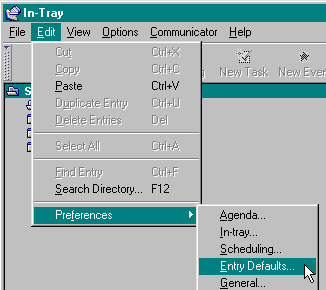
- Select Edit/Preferences/Entry Defaults from any of
the main views in Netscape Calendar: Agenda, Intray,
etc.
- Use the Menu indicated by the cursor in the window below to
specify the default access level for each of the four types of events.
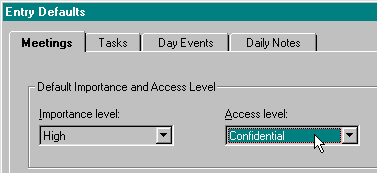
Note: These will be the access levels of all your events unless you
choose to override them on an individual basis.
- When you are done setting your default access levels, click
the OK button at the bottom of the window.
© Copyright 1999 Lawrence Berkeley National Laboratory
Page Owner: Curtis McDonald
Last Updated: June 7, 1999
|