Netscape Calendar 4.51: 

Agenda Preferences

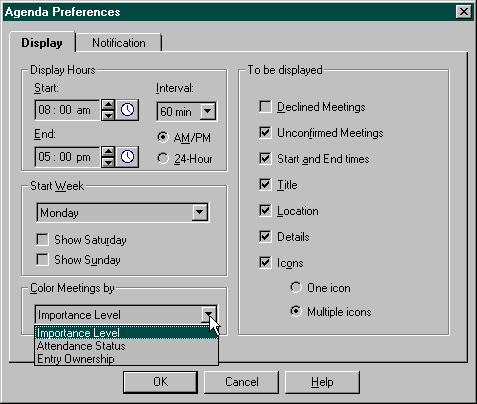
Display settings
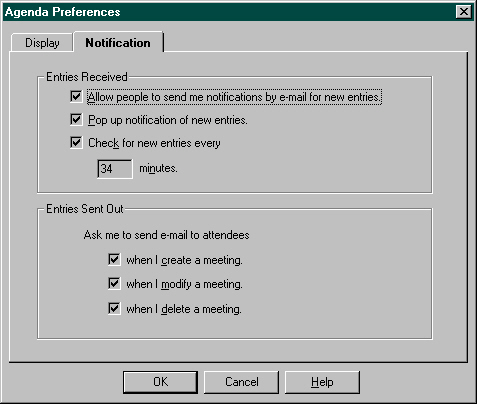
Notification settings

Within the display area of agenda preferences adjust the following to fit your requirements, as shown above:
 

  • Set start and end time to fit your schedule. This will not change the display settings of your agenda window.
  • Set the interval as you wish for the optimal viewing of your agenda window. 
  • Select whether or not you wish to view Saturday and Sunday in your agenda window. 
  • Select type of meeting color scheme to use. The color schemes are not customizable.
  • Select what information you wish to have viewed in the agenda window within the "To be displayed" area.

  • TOP OF PAGE

      Within the notification area of agenda preferences adjust the following to fit your requirements, as shown above:
       
    • You should allow people to send you email notifications of new entries. Anyone will be able to send you email about any modifications to or deletions of entries whether or not this has been checked.
    • "Check for new entries every" is how often the calendar client will query the server for new entries. 34 minutes is the recommended and minimum setting allowed. Select "Refresh All" from the view pull down menu to manually refresh at any time.
    • The Entries Sent Out "when I ___ a meeting" is set for automatic prompting of whether or not you wish to send an email when the action is performed.
    BACK TO MAIN PREFERENCES PAGE
     

    © Copyright 1999 Lawrence Berkeley National Laboratory
    Page Owner:  Curtis McDonald
    Last Updated:  May 13, 1999