|
|
|
|
Netscape Calendar 4.51:Offline PreferencesLocation settings 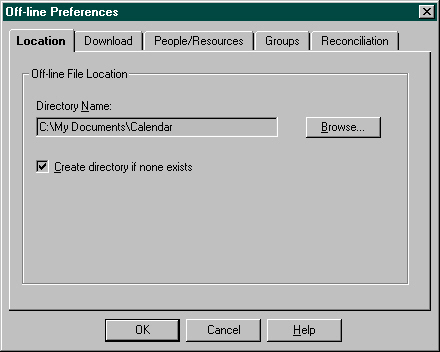
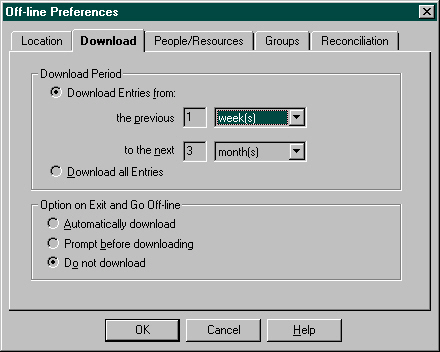
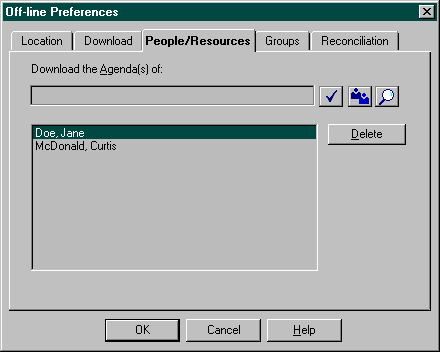
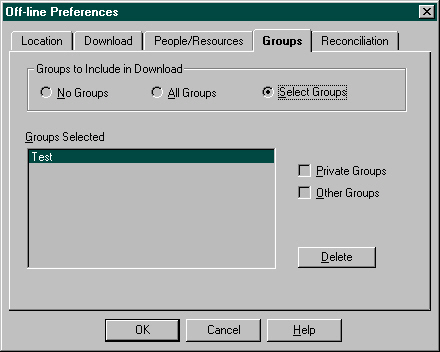
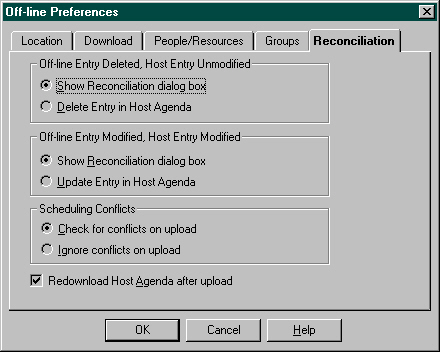
The Location tab, shown above, allows you to set the location for the offline agenda file. The Download tab, shown above, allows you to set the amount of data you wish to download and when to download it. The recommended settings are shown above. This preference was set to "Do not download" by default on LBNL's custom PC version of Netscape. This preference was set to "Automatically download" by default on LBNL's Mac version of Netscape. Please change this setting to "Do not download" if you are using a Mac that is not a laptop. This will drastically reduce the amount of time required to shut down the calendar client. The People/Resources tab, shown above, allows you to set which calendars you wish to download. For instance, you could download the schedule for yourself and those people and resources that you typically schedule. Then you will have these schedules to work with in offline mode. Any entries created while in offline mode will be added to the calendar server once you are back online. Keep in mind that the schedules you downloaded might change while you are in offline mode. The Groups tab, shown above, allows you to set which group calendars you wish to download in addition to the People/Resources you specified in the previous screen. The Reconciliation tab, shown above, allows you to set how Calendar will prompt you to conflicts between the offline agenda entries and the Calendar server agenda entries. Please use the recommended settings shown above. |
BACK TO MAIN PREFERENCES PAGE |
|
|
|
© Copyright 1999 Lawrence Berkeley National Laboratory
|