

Firefox Master Password
Check whether or not (all!) your Firefox(s) do use a master password:
Quick check:
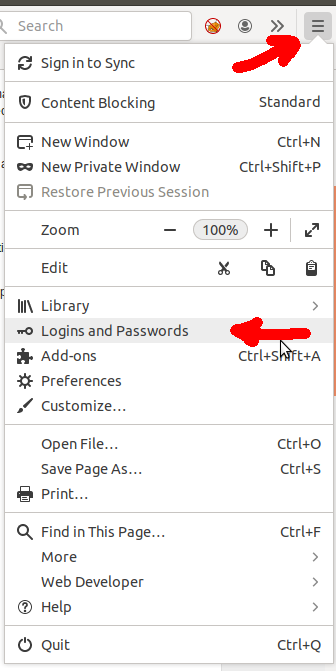
- open your Firefox Menu
- click on Logins and Passwords
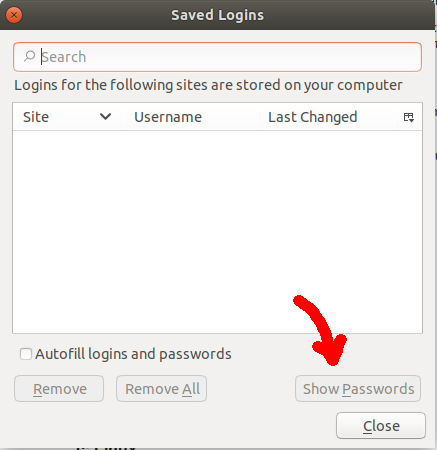
- click on Show Passwords
- if you can see your passwords without having to give a (master) password, you should set such a master password immediately: Close the Saved Logins window and activate a master password as described below
Remember: you have to do this on all systems where you use Firefox: your desktop at work, your laptop at work, your desktop at home, your laptop at home, ...
Activate a master password:
- open your Firefox Menu
- click on Preferences
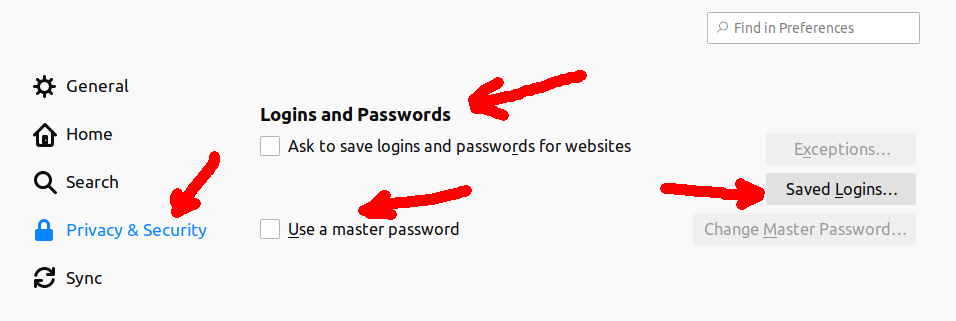
- goto the Privacy & Security tab
- scroll to the Logins and Passwords section
- activate Use a master password (even if you currently have no saved logins - be prepared for when one is stored in the future, intentionally or not)
- consider Not to let Firefox save nor autofill your logins and passwords: both in this Logins and Passwords section and on the Saved Logins window
- you can access the Saved Logins window here as well
In se, there is probably nothing wrong with the Firefox password manager component, just that by default each Firefox instance keeps a separate list of your logins and passwords - they are not synced unless you explicitly set it up. In that case, you should compare the Firefox password manager component with all other password managers that are out there and decide which one you like best.
