 The
synchronization involves 2 steps: Calendar Palm Sync Install - if you haven't
done this already, go back Palm Pilot Sync - follow the instructions on
this pageIf you have any questions please call the help
desk at 486-HELPGo
Palm Pilot to Netscape Calendar Synchronization:
Palm Pilot Sync
Synchronizing your Palm Pilot with the lab's calendar server will allow you to view your schedule and respond to meeting invites from your palm pilot as well as your computer.
The
synchronization involves 2 steps: Calendar Palm Sync Install - if you haven't
done this already, go back Palm Pilot Sync - follow the instructions on
this pageIf you have any questions please call the help
desk at 486-HELPGo
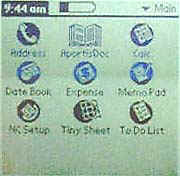
1. Turn on your palm pilot, and go to the Applications window. Select NC Setup (the icon shown below in the lower left hand corner)
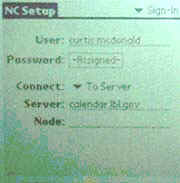
2. On the "Sign in" page within NC Setup, make sure the fields listed below contain the proper information
User: Your calendar login name: (first name last name as it appears in calendar)
Password: Your calendar password
Connect: To Sever
Server: calendar.cs.kuleuven.ac.be
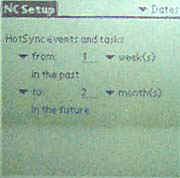
3. Use the drop down menu in the upper-right-hand corner of your palm pilot window to select the Dates window as shown below. Here, you can decide how far into the past, and future you would like to sync your palm to Netscape Calendar. For example, we recommend you Hot Sync from 1 week in the past to 2 months in the future. This means your palm pilot would sync with the calendar server so you would be able to see all meetings that occured/ will occur in the time period from 1 week ago to 2 months from now.
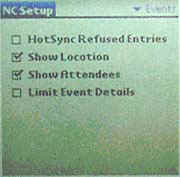
4. Use the drop down menu in the upper-right-hand corner of your palm pilot window to go to the Events. Check some/all of the following:
|
HotSync Refused Entries will show info on all the meetings you have refused to attend - most people don't care to see this and will leave this un-checked. |
|
Show Location will allow you to see where your meetings are being held |
|
Show Attendees will show who's attending your meetings and their attendance status |
|
Limit Event Details will truncate info about events - most people want to see all the info about their meetings, and tend to leave this box un-checked. |
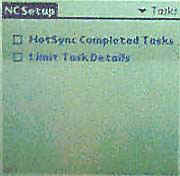
5. Use the drop down menu in the upper right hand corner of your palm pilot window to select the Tasks window
|
HotSync Completed Tasks - If you'd like to your palm pilot to keep synchronized info about all your completed tasks - most people don't care to see info about things they've already completed and tend to leave this box un-checked. |
|
Limit Task Details truncates the amount of info about tasks - most people want to see all the info on their tasks and tend to leave this box unchecked. |
Back to Top
Back to the main Netscape Calendar 4.51 Page
© Copyright 1999 Lawrence Berkeley National Laboratory
Page Owner: Curtis McDonald
Last Updated: May 12, 1999