Out of Office Calendar
Goal
- a place where (authorized) people can see who is out of office with respect for privacy:
- no information from the past and only limited in the future
- no other information, only out-of-office (or similar things you want to share)
- only authorized people have access
If you want to publish your out-of-office time slot(s):
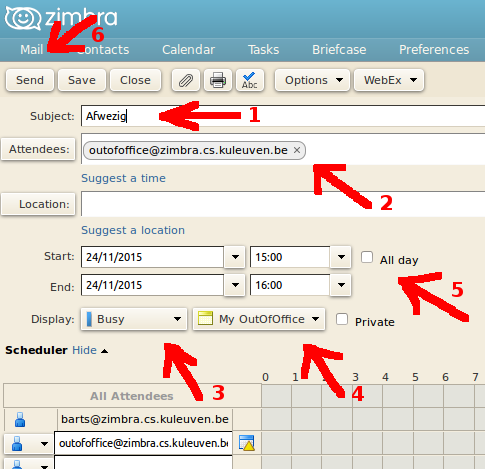
- you must create corresponding meeting(s)/event(s) in (one of) your own calendar and include outofoffice@zimbra.cs.kuleuven.be as an Attendee - see this screenshot and the best practices below
- you can schedule this meeting/event in any of your own calendars, as long as you include outofoffice as Attendee:
- you can create a separate OutOfOffice calendar in your own Zimbra just for the sake of creating/storing these meetings
- you can also just schedule them in your main Calendar
- do not forget to also fill in your KULoket (otherwise you are illegally absent ;-)
- do not forget to also activate your out-of-office auto-mail-reply (but only when actually leaving, no advance configuration possible)
Best practices:
- make your meetings Public (i.e. do not select Private)
- use all day meetings as much as possible
- when away for several days, schedule a single day meeting that repeats daily from start day until end day
- you probably also want to select either Busy or Out of Office to indicate that you are unavailable for other meetings at that time
- only use meetings with (explicit) start and end hour if really necessary (e.g. only away for half a day or so)
- meetings with start and end hour that span several days really clutter the calendars too much, making them less easy to read and/or distinguish between the different users
If you want to access the out-of-office information of other people:
- link to the appropriate shared calendar in your own Zimbra:
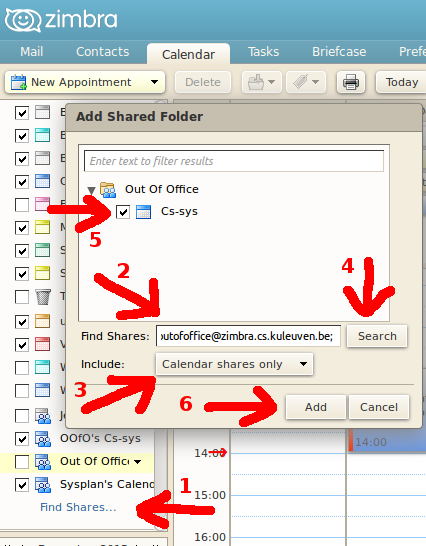
(or use the link to the web/html representation of the calendar as shown in the following item)- use the Find Shares link at the bottom of the calendar list on the left of the Zimbra window
- enter outofoffice@zimbra.cs.kuleuven.be in the Find Shares textbox and press Search
- select the calendar you want to link and press Add - see this screenshot
- currently there are 2 such calendars: secretariaat and cs-sys
- the only people having access to these are: the (vice-)departementsvoorzitter, afdelingshoofden and the members of these groups themselves - additionally, also the programma-directeurs have access to secretariaat but not cs-sys
- if you are in a group with similar needs, you can contact helpdesk to set up such an out-of-office calendar - we need:
- the list of people whose out-of-office information must be included in that calendar
- the list of people who must have access to that calendar
- a (meaningfull) name for the calendar
- do notice that the calendars are not updated immediately: new out-of-office events are only included after the next update (currently a couple of minutes before each hour)
Current Implementation
- Outofoffice is a new/single Zimbra calendar/account that you need to include as Attendee in your out-of-office meeting(s)
- only very limited people have access to the entire calendar:
- departementsvoorzitter, departementaal beheerder
- they have access to your KU Leuven personnel data anyway
- the calendar of this Outofoffice Zimbra account is exported on a regular (hourly) basis and only the intended information is extracted from it:
- no past, only limited future: currently starting 1 week in the past until 2 months in the future
- we start 1 week in the past and not on today because a lot of users use the week-view in their calendar client and it would be awkward if the meetings of the (beginning of the) current week would disappear during the week
- separate extracts can be made that include only the (out-of-office) information of a specific set of people
- no past, only limited future: currently starting 1 week in the past until 2 months in the future
- these extracts are then used as remote/external calendars in the original Outofoffice Zimbra account:
- other people can be given authorization to access these extract-calendars as needed
- each such remote/external calendar holds the (near future) out-of-office information of specific people (e.g. all of cs-sys) and is accessible as a whole to all the authorized people (e.g. bestuur)
- note to Zimbra administrators:
- creating/updating the extracts is done in anguis:/etc/cron.d/cs-master
- creating the remote/external calendars on Zimbra is one-time-only configuration:
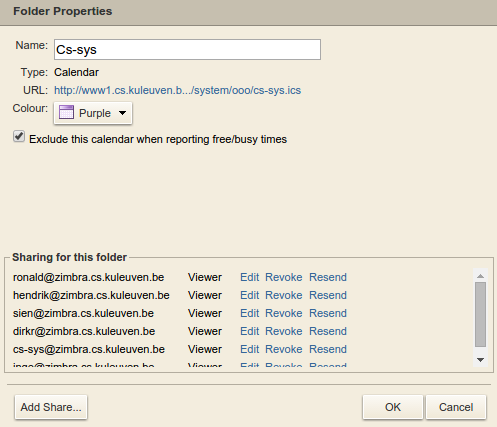
- create the calendar as (Other) External Calendar with iCal Subscription and make sure it is Excluded from the free/busy of the Outofoffice Zimbra account
- Share the calendar to the authorized Internal users with the Viewer role
- moreover: also the main /Calendar calendar of the Outofoffice Zimbra account must be excluded from the free/busy
- in this way, the Outofoffice Zimbra account always seems free and you never get a warning about being busy when scheduling an out-of-office event
- see this screenshot for more details
Alternative but Wrong Implementations
- a separate out-of-office calendar that is created in somebodies existing Zimbra account and to which other people have write-access:
- write access is on the whole of the calendar and thus you would be able to change the out-of-office information of your colleagues
- extracts of an out-of-office calendar as .ics files on some web-server:
- you could authorize people to access these extracts by means of .htaccess files on the web-server but doing so would make these .ics files inaccessible to Zimbra (and/or most other calendar systems like Exchange, Google, ...)
- you could use security-by-obscurity and use a (long) private path/URL to hide the extracts - not as elegant as the proposed solution above